 By skyforbes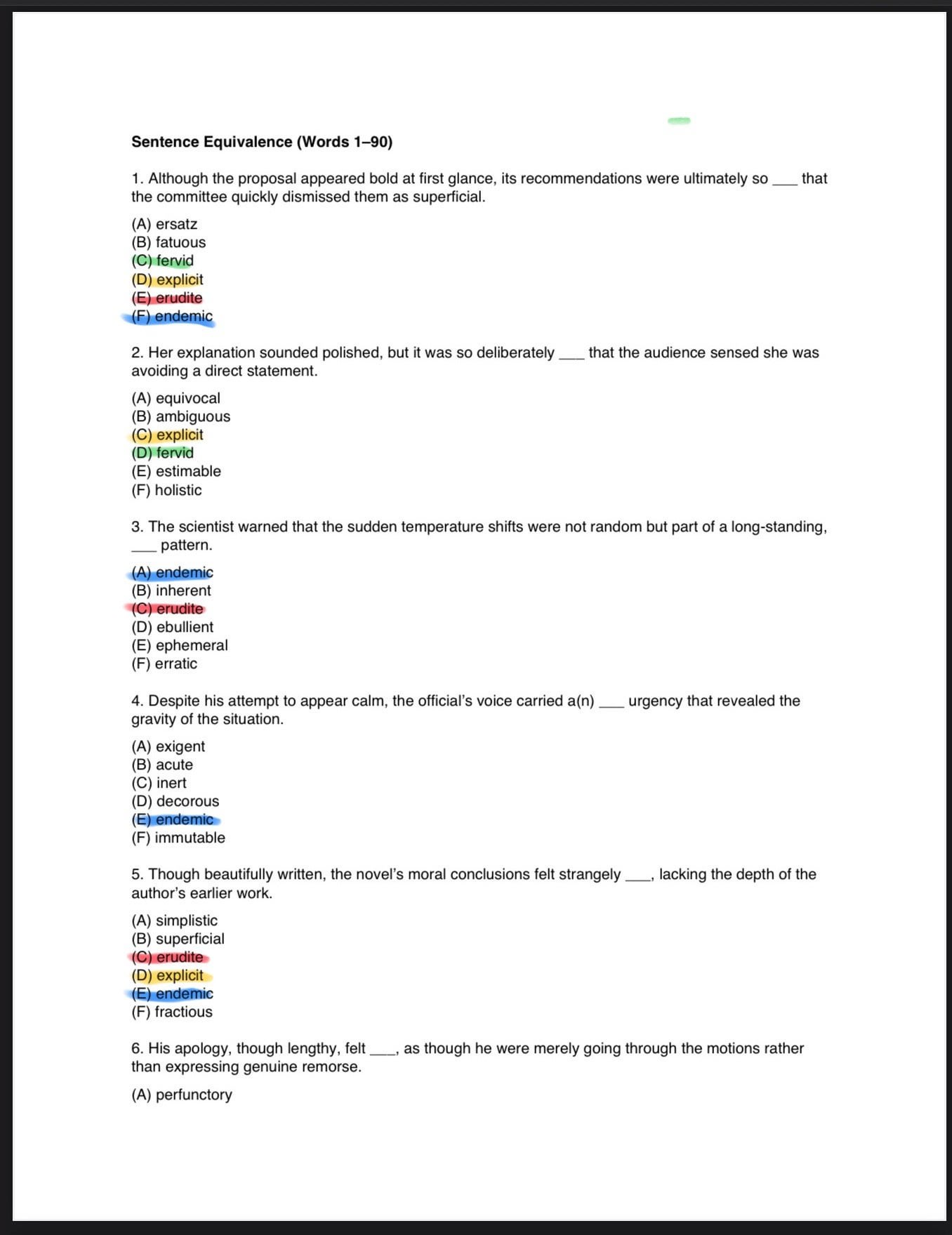

I planning on taking the GRE in a few months and have recently started studying. I have a deck of ~500 vocab words I want to learn apart of the test prep. After I memorized the first 50 I thought of the idea to use ChatGPT to make practice GRE-style ‘Verbal Reasoning’ questions using the words I’ve been studying.
The first time I did it with my first set of words, it worked great. I think I made about 20-30 of each question type (Text Completion, Sentence Equivalency, and Reading Comp). My idea was I could come back with a new set of words (I’ve made a ‘word bank’ with each word, its definition, and a few synonyms in a separate doc) and ChatGPT could easily generate me a new set of practice test in PDF form.
Unfortunately, I ran into problems the next time I tried this with my next set of 40 new words. It’s been a few days and I’m still not able to replicate the set I made the first time. At first, it was the formatting. Then, after halfway through a question set the multiple choice options would stop being randomized and each correct answer with be ‘A’. The last version I made, I realized the model was not using all 90 words I had given it and there were multiple words showing up every other question.
Like I said I’ve been trying to get this right for DAYS now and would really appreciate some help! Below I’ll put an example of one of the prompts ChatGPT helped me create that is supposed to command the generation of what I’m looking for and some screenshots too.
Pictures: https://imgur.com/a/nDd9Jja
Prompt (for text completion questions):
Create [X] GRE-style Text Completion questions using vocabulary Words [X–Y] ONLY from the word bank I’ve provided.
For each question:
– Use 1, 2, or 3 blanks (at least [X] 1-blank, [X] 2-blank, and [X] 3-blank).
– Ensure questions with 1, 2, or 3 blanks are naturally distributed throughout file (e.g., don’t put at single blank questions first, 2 blanks second, etc.)
– Sentences must match GRE tone, difficulty, and structure.
– Each blank has only one correct answer, and the full set of blanks must produce a logically consistent meaning.
– Provide 5 randomized answer choices (A–E) per blank or set of blanks, in the standard GRE format.
“For every question, independently randomize the order of answer choices. Ensure that:
– the correct answer(s) appear in fully randomized positions,
– no two consecutive questions share the same correct-answer slot pattern,
– no clustering occurs (e.g., correct answers repeatedly appearing in A),
– no repeated A–F ordering pattern appears across multiple questions, and
– distractors are also independently shuffled for each question.”
– Ensure no repeated vocabulary words across the entire set unless explicitly allowed.
– Ensure incorrect choices are plausible but clearly wrong.
– Use diverse topics (e.g., science, politics, literature, art, ethics, history) and varied grammatical structures.
– Maintain high variation in answer choices; avoid clustering the same distractors.
Formatting Requirements (Exact GRE Style):
1. Add a bold header at the top of the first PDF only:
Bold Text Completion (Words X–Y)
2. For each question, format as:
[Question number]. [Sentence with 1–3 blanks]
3. Spacing:
• Add one blank line between questions
• Add natural spacing above/below tables
4. One-blank questions:
• List answer choices vertically beneath the sentence:
(A) …
(B) …
(C) …
(D) …
(E) …
5. Two- or three-blank questions (GRE-style multi-column layout):
• Create side-by-side answer-choice columns, one column per blank
• Label each column ABOVE the answer list, centered:
Blank (i) Blank (ii) Blank (iii)
• Under each label, stack five choices vertically:
(A) …
(B) …
(C) …
(D) …
(E) …
• Align columns horizontally on the same baseline, exactly like GRE
• No borders or boxes (Option A3)
• Maintain clean spacing so columns do not touch
7. PDF Export Requirements:
Generate in chat to avoid error/crashing. Then export in a PDF, using multiple files if necessary.
• Use natural page breaks
• Use filenames such as:
TC_Practice_Set_Part1.pdf
TC_Practice_Set_Part2.pdf
• Only the first PDF contains the bold header
• All remaining parts must omit the header
–––––––––––––––––––––––––––––––––––––––––
Answer Key Generation Instructions (AFTER question PDFs are created):
After all Text Completion PDFs are finalized, generate a separate PDF titled:
TC_Answer_Key.pdf
Include:
– A numbered list matching the question numbers
– The correct answers for each blank
– Concise GRE-style explanations (1–2 sentences)
– No RC-style lengthy explanations
– Same formatting style as the Words 1–40 answer key PDF
Do not produce the answer key until I give the command:
“Generate TC Answer Key.”
–––––––––––––––––––––––––––––––––––––––––