 By skyforbes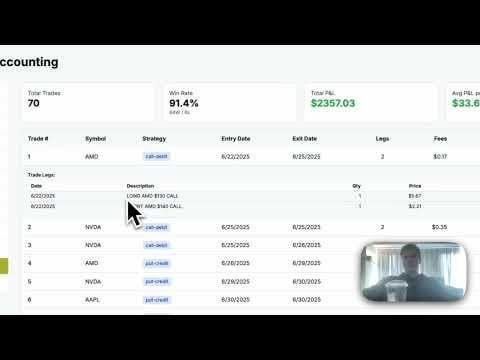

If you’ve ever tried to download your trade history from Robinhood, you know how barebones it is — no real P/L breakdowns, no strategy tagging, and definitely no API access.
So I hacked together a workaround.
Here’s how it works:
I go into my Robinhood History tab, copy all the visible transaction data, and paste it into my platform. Behind the scenes, it turns that pasted text into structured trade data — it figures out your opens, closes, strategy type, and realized profit/loss — and maps it into the PLAID data, creating a Chart of Accounts for bookkeeping.
That means I can finally get clean trade logs for taxes, see which trades made or lost money, and connect it all to your accounting ledger automatically.
Trading Journal Tab:
This is where it gets fun.
It fetches my opened and closed option trade rows, bundles each leg of the trade together, totals my fees, and shows my realized profit/loss.
I get quick stats up top: total trades, win rate, total profit, average profit per trade. Below that is a table of every trade with strategy tags and expandable rows that show the full details of each leg. Basically a highlight reel of my trading history, but accurate.
Why I Built It:
Robinhood’s API doesn’t exist. I can’t even properly account for my own trades without manually calculating everything. So this tool fills that gap — until Robinhood decides to give us what should’ve been available years ago.
TL;DR:
Robinhood hides your real trade data. I built a workaround that lets you copy your history, paste it into my tool, and get full trade logs + accounting-ready data.
The bookkeeping side auto-categorizes your spending too.
Right now, I'm reconciling and its getting ~85% correct with a little more work to go before its 100% working!